We dispatched technicians to the shipyard in Zhoushan to troubleshoot the automation system for hatch cover operation of bulk carriers. The goal is to resolve abnormal operations of hatch covers, ensure the equipment works properly, prevent cargo damage, hull structure defects, delays to port loading/unloading and ship arrival & departure schedules, and reduce time and economic losses for the ship owner.
Part I Fault Overview & Preliminary Maintenance Plan
Based on feedback from the ship’s engineering department, multiple faults exist in the hatch cover control system. Specific issues and maintenance plans are as follows:
1. Malfunction of Operation Buttons
1.1 No response after pressing the hatch open/close buttons.
1.2 Operation is reversed: the hatch closes when pressing the open button, and opens when pressing the close button.
1.3 Only inching operation is available. The hatch moves when holding the button and stops immediately after release; continuous operation fails.
2. Abnormal Operation of Hatch Covers
2.1 Abnormal hatch closing
(1) The hatch stops halfway and cannot close completely.
(2) The hatch runs slowly at the final stage of closing and fails to fully shut.
2.2 Hatch over-travel when opening: The hatch opens beyond the limit and stops only after hitting the mechanical stop.
2.3 Random stop during operation: The hatch stops unexpectedly while opening or closing.
3. Impact of Faults
The above faults seriously affect cargo loading and unloading, and increase the workload of deck and engineering staff. If not rectified timely, they will delay ship schedules, even lead to ship detention during PSC inspections, and cause losses to the ship owner.
4. Preliminary Maintenance Plan
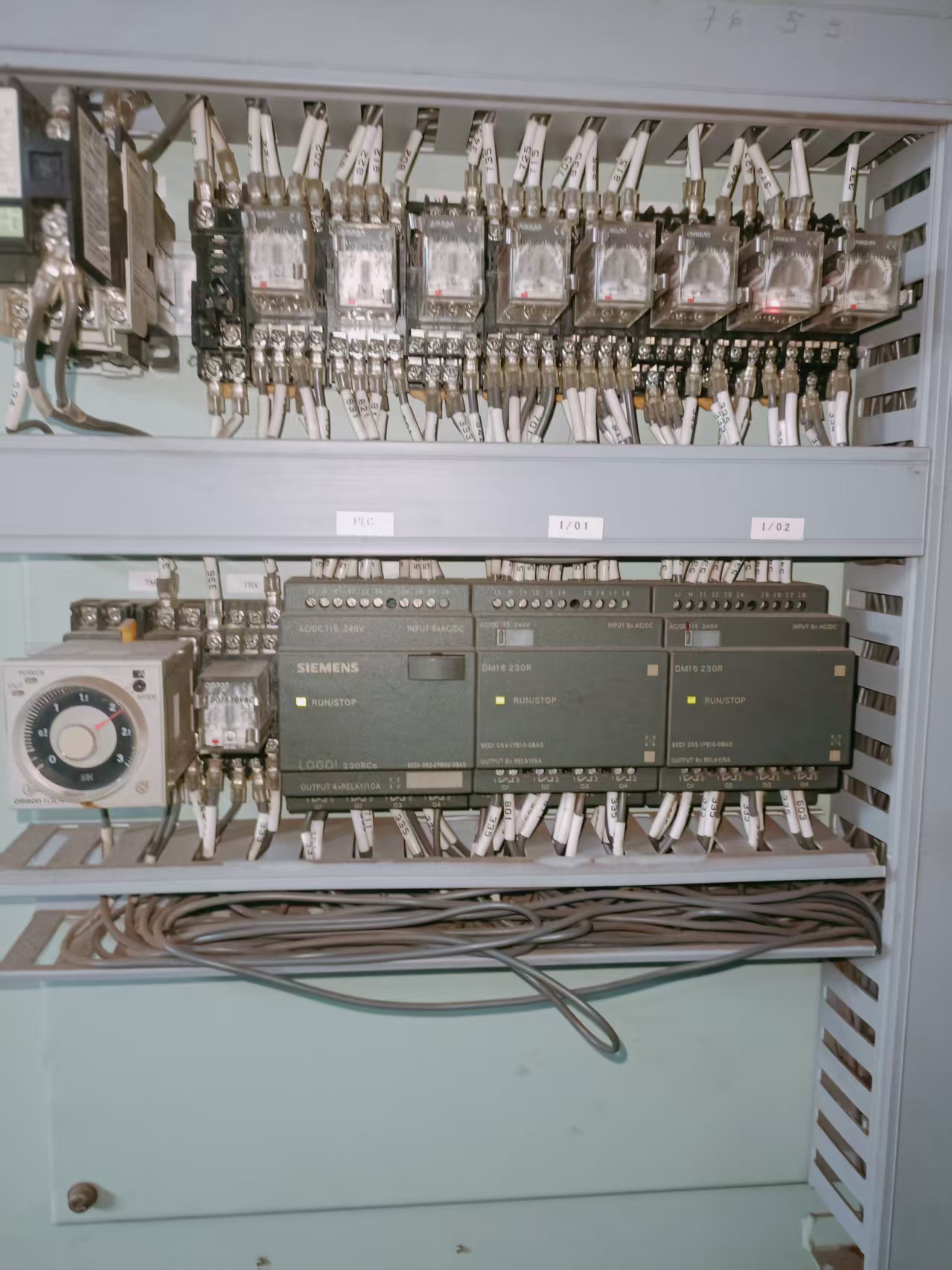
4.1 Prioritize the inspection of peripheral electrical systems. Start with operation buttons and control circuits, and inspect buttons, terminals, intermediate relays, PLC I/O signals and interlock circuits to fix button-related faults.
4.2 After basic electrical inspection, verify control circuits including limit switches, interlocks and overrun protection to eliminate random stops, over-travel and incomplete closing. Previous inspection results help locate faults efficiently.
4.3 Inspect hydraulic systems at last. Cooperate with engine staff to check hydraulic units according to on-site progress.
Part II On-site Troubleshooting & Solutions
1. Malfunction of Operation Buttons
1.1 No response after pressing the hatch open/close buttons
Cause Analysis
(1) Tripping of control circuit power supply, resulting in power failure of PLC and relay coils, and system shutdown.
(2) Interlock conditions are not satisfied (e.g. locking pin not retracted, hydraulic pump not started), so PLC refuses to output operation commands.
(3) Emergency stop circuit is activated. The PLC receives the emergency stop signal and cuts off all outputs.
Troubleshooting
(1) Inspect the power supply circuit, circuit breakers and fuses. Confirm no tripping occurs.
(2) Check interlock conditions: Ensure the locking pin is fully retracted, start the hydraulic pump and verify its normal operation and stable pressure.
(3) Observe the indicator light of emergency stop input point on the PLC. Light on = Emergency stop activated, PLC cuts off all outputs and the equipment stops working.
Solutions for Emergency Stop Fault
(1) Check all emergency stop buttons on board. Rotate the pressed buttons clockwise to reset.
(2) Check the status of the emergency stop input point on PLC. Confirm the signal disappears (Light off = Emergency stop reset) and the system releases interlock.
(3) Conduct on-site test to verify normal start and stop of the hatch cover.
1.2 Reversed operation
Fault Phenomenon: The hatch closes when pressing the open button, and opens when pressing the close button.
Cause Analysis
(1) Wrong wiring of contactor control circuits for hatch open and close functions.
(2) PLC program is modified incorrectly, leading to reversed definition of output points.
(3) Wrong wiring of button signal lines after previous maintenance.
Troubleshooting
(1) Inspect contactor control circuits and confirm no reversed wiring.
(2) Refer to drawings to confirm corresponding output points for hatch open and close (e.g. Main unit Q1, Q2 or expansion module Q5, Q6). Press the operation buttons respectively and observe indicator lights on PLC, expansion modules and action of intermediate relays. When pressing the open button, the designated open output point keeps off ,while the close output point lights up and the corresponding relay operates. It is confirmed that the PLC output logic is reversed with normal external wiring.
(3) Inspect button signal lines and confirm correct wiring.
Solutions
(1) Keep the control cabinet powered on. Connect the laptop with programming cable and run LOGO! software. Upload and back up the original program first.
(2) Open the uploaded program and confirm the output points for open/close commands are reversed.
(3) Double-click the output coils, exchange the corresponding output addresses and save the program.
(4) Download the modified program to the LOGO! controller.
(5) Test on site to confirm normal operation of the hatch cover.
Important Notes during LOGO! Software setting
(1) The controller will automatically switch to STOP mode during program download and return to RUN mode afterwards. Do not cut off power during the process.
(2) Ensure the hatch is in a safe position before program modification. Never modify programs when the hatch is open to avoid accidental movement.
(3) Restore the backup program immediately if faults get worse after modification.
(4) Back up the updated program after commissioning for future maintenance.
1.3 Only inching operation available
Fault Phenomenon: The hatch moves when holding the button and stops after release; continuous operation is unavailable.
Cause Analysis
(1) Continuous operation mode is disabled in PLC program, only inching mode is retained.
(2) Self-locking circuit fails and the contactor coil cannot stay energized.
(3) Poor contact of button contacts, which can only send instantaneous signals to PLC.
Troubleshooting
(1) Connect the laptop to PLC and check the program. Confirm continuous operation mode is enabled.
(2) Test the self-locking circuit with a multimeter. Confirm the contactor coil keeps energized normally.
(3) Dismantle and inspect the button. Confirm poor contact of internal contacts.
Solutions
Repair the button contacts or replace the button if damaged.
Test after repair. Continuous operation function returns to normal.
2. Abnormal Operation of Hatch Covers
2.1 Abnormal hatch closing
Case 1: The hatch stops halfway and cannot close completely
Cause Analysis
(1) Close limit switch malfunctions and sends closing completion signal in advance, so PLC cuts off the closing output.
(2) Poor contact of contactor control circuit for closing function, low coil voltage and frequent chattering of the contactor.
(3) Abnormal interlock logic of locking pin. PLC misjudges the locking pin as not retracted and terminates closing commands.
Troubleshooting
(1) Test the close limit switch and confirm no malfunction.
(2) Measure the contactor control circuit with a multimeter. Confirm poor contact, low coil voltage and frequent contactor chattering.
(3) Verify normal operation of locking pin interlock logic.
Solutions
(1) Clean and maintain the contactor contacts. Replace the contactor if severely damaged.
(2) Test on site after repair. The hatch can close completely.
Case 2: Slow running at the final stage of closing and incomplete shut
Cause Analysis
(1) Abnormal delay and deceleration signals in control circuit. PLC outputs deceleration signal in advance, resulting in insufficient hydraulic pressure.
(2) Ground fault and loose terminals of control lines lead to low voltage of contactor coil and abnormal power supply of main circuit.
Troubleshooting
(1) Connect laptop to PLC and verify normal delay and deceleration signals. Meanwhile confirm stable pressure and normal operation of hydraulic system. (2) Find damaged cables causing ground fault and loose terminals, which lead to low voltage of contactor coil.
Solutions
(1) Repair damaged cables and fasten loose terminals.
(2) Test on site. The hatch runs normally at the final stage and can close fully.
2.2 Hatch over-travel when opening
Fault Phenomenon: The hatch opens without limit protection and stops after hitting the mechanical stop.
Cause Analysis
(1) Open limit switch failure. No position signal is sent to PLC and the system keeps outputting opening commands.
(2) Disconnection of limit signal cables. PLC cannot receive position feedback. (3) Invalid overtime protection parameters. The PLC fails to stop the equipment as scheduled when limit protection fails.
Troubleshooting
(1) Test the open limit switch and confirm normal action.
(2) Inspect limit cables and confirm no disconnection. PLC can receive signals normally.
(3) Upload PLC program via laptop and confirm overtime protection parameters are invalid.
Solutions
(1) Reconfigure overtime protection parameters via programming software.
(2) Test on site after setting. Limit protection function works normally.
2.3 Random stop during operation
Fault Phenomenon: The hatch stops unexpectedly while opening or closing.
Cause Analysis
(1) Motor overload protection is triggered and PLC cuts off output circuits.
(2) Loose terminals cause intermittent power supply to PLC and contactor coils.
(3) False triggering of locking pin interlock signal leads to forced stop by program.
Troubleshooting
(1) Inspect overload protection devices and confirm no activation.
(2) Check all control terminals. Good contact and stable power supply are confirmed.
(3) Monitor PLC program via laptop and confirm false triggering of locking pin interlock signal.
Solutions
(1) Optimize and reset parameters of locking pin interlock via programming software.
(2) Test on site. The hatch operates stably without random stops.
Part III Distinction of Non-control Circuit Faults
Some faults are misjudged as control circuit failures while the root causes lie elsewhere:
(1) Hydraulic system faults: Insufficient pump pressure, stuck solenoid valves or leaking pipelines will cause incomplete closing and low running speed, while control signals remain normal.
(2) Mechanical jamming: Deformed rails or stuck rollers lead to sudden stops, and no abnormal signals are received by PLC.
(3) Main circuit faults: Damaged contactors, circuit breakers or motors in power cabinets will result in equipment failure. These faults are beyond the scope of this control cabinet.
More relevant info sharing for
(1) Similar programmable controller faults on ro-ro vessels. Check our full service record: <Car Carrier PLC Inspection & Troubleshooting>, which shares practical experience of on-site electrical fault elimination.
(2) Auxiliary engine ECU breakdowns will interfere with the normal operation of deck automation equipment. You can refer to our complete repair case: <Bulk Carrier Auxiliary Engine ECU Fault Diagnosis>.
Part IV Write at the end
No matter how advanced the equipment is, it is ultimately a tool to guarantee the safety and operation of ships. We must have the courage and confidence to master it.
No matter how sophisticated the technology is, it derives from accumulated professional knowledge and practical experience. We should stay confident in learning and operating it proficiently.
Equipment and technology will never dominate the safe and efficient operation of vessels. Automated facilities and cutting-edge technologies always serve as strong supports for us to improve work quality, overcome difficulties and create greater value for ship maintenance.
With the continuous upgrading of ship automation and intelligence, traditional mechanical and hydraulic faults are becoming less frequent, while troubleshooting and maintenance of electrical control systems have become the core of repair work. As automation is an inevitable trend in marine maintenance, we need to continuously consolidate theoretical knowledge and accumulate on-site experience, so as to accurately identify and efficiently resolve faults within complex control systems.
Actively adapting to industrial changes and embracing automation is not only a basic requirement for our work, but also an essential path to improve professional capabilities, maximize equipment efficiency and ensure stable and safe ship operation.



 +8615005328513 (wechat ) +8613606393913 (Whatsapp)

 No. 8888, Huangshan Road, Huangdao District, Qingdao City, Shandong Province, China.